Table-level security
Table-level security limits which tables and views a Share exposes. You give the Share an include pattern, and consumers see only the tables and views that pattern names. Everything else is absent from their catalog, and a query against a hidden table fails as though the table doesn't exist.
Use this when you need to:
- Publish only part of a database without maintaining a second copy of it.
- Serve two audiences from one source database, each seeing its own tables.
- Keep staging and scratch tables out of a consumer's catalog.
You'll know it worked when the consumer's catalog lists only the tables and views you named. See Verify what a Share exposes for the steps.
Table-level security is available on Business and Enterprise plans.
Before you start
- You own the source database, since only a Share's creator can set its include pattern.
- The source is a native MotherDuck database. DuckLake isn't supported; see Limitations.
- The source database is attached to your session, so MotherDuck can validate the pattern against its catalog.
Set an include pattern on a new Share
- UI
- SQL
-
Select the trident next to the database you want to share, then select Share.
-
Turn on Filter schemas, tables, and views. If the toggle is disabled, the dialog shows the reason: the source database is detached, or it uses a storage type that doesn't support filtering.
-
Choose what to expose. Browse gives you a searchable schema tree of checkboxes; Wildcard lets you type patterns directly. Your choices collect in a selections list underneath, each showing how many tables and views it matches, and a pattern MotherDuck rejects shows the error inline so you can correct it before submitting.
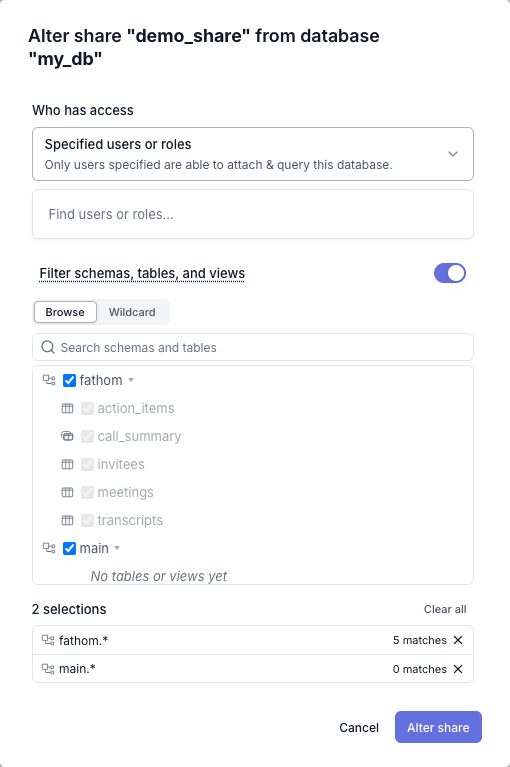
Checking a schema box and checking every table in that schema are different choices. The schema box produces a whole-schema pattern, so tables added to that schema later are exposed too. Checking tables individually produces a fixed list, and later additions stay hidden. Leaving the toggle on with nothing selected exposes nothing.
-
Set the access, visibility, and update options as you would for any Share.
-
Select Create share.
The Wildcard tab takes the same patterns you'd pass to INCLUDE_PATTERN in SQL, and reports how many tables and views each one matches as you add it:

Pass INCLUDE_PATTERN as a comma-separated list of patterns:
-- Expose every table in the reporting schema, plus one table from main.
CREATE SHARE sales_share FROM sales (
    INCLUDE_PATTERN 'reporting.*, main.orders',
    ACCESS RESTRICTED,
    UPDATE AUTOMATIC
);

GRANT READ ON SHARE sales_share TO ROLE finance;
A pattern matches a qualified schema.table name, and * is the only wildcard. It matches within one segment, never across the dot:
| Pattern | Matches |
|---|---|
reporting.* | Every table and view in the reporting schema |
reporting.fact_* | Every table in reporting whose name starts with fact_ |
orders | The orders table in main, because a pattern with no dot is qualified with the default schema |
*.* | Every table in every schema |
MotherDuck validates every pattern against the source database's catalog when you run the statement, so a typo fails the statement instead of silently producing an emptier Share than you intended.
For the full pattern syntax, the validation rules, and how to quote names that contain ., *, or ,, see the INCLUDE_PATTERN clause.
The pattern belongs to the Share rather than to a grant, so every consumer of one Share sees the same tables and views. To serve two audiences different tables, create one Share per audience over the same database and grant each Share separately.
Verify what a Share exposes
Attach your own Share under a different alias and read its catalog. This is the most direct check, because it reads the Share exactly as a consumer does.
- UI
- SQL
- Select the trident next to the Share under Shares I've created.
- Select Attach, then, if needed, enter an alias that no existing database uses.
- Open the attached database in the object explorer and confirm the tables and views match what you intended.
ATTACH 'md:_share/sales/<share_token>' AS sales_check;

SELECT schema_name, table_name
FROM duckdb_tables()
WHERE database_name = 'sales_check'
ORDER BY ALL;
To see the patterns stored on a Share without attaching it, read the INCLUDE_PATTERN column from LIST SHARES:
SELECT name, include_pattern FROM MD_INFORMATION_SCHEMA.OWNED_SHARES;
Change or remove an include pattern
Editing the pattern leaves the Share URL unchanged, so consumers stay attached.
- UI
- SQL
Select the trident next to the Share, select Alter, and edit the selection.
Use ALTER SHARE:
-- Replace the pattern.
ALTER SHARE sales_share SET INCLUDE_PATTERN 'reporting.*';

-- Remove the pattern, exposing the whole database again.
ALTER SHARE sales_share RESET INCLUDE_PATTERN;
An edit reaches a connected consumer on the next update cycle, within a minute or two. That includes your own held-open connection, so if you're checking the result yourself, detach and re-attach to see it immediately.
What a consumer sees
- Hidden tables and views are absent from the catalog, and a query naming one fails with a standard missing-object error. The "Did you mean...?" suggestion only recommends accessible tables and views.
- A consumer can't tell a filtered Share from an unfiltered one. Both the
Filteredmarker and the pattern are owner-scoped, so a consumer sees only the resulting catalog. - The include pattern is enforced on MotherDuck's servers, not in the client, so an older or modified client sees the same filtered catalog.
- The Share is read-only, as all MotherDuck Shares are.
For the rest of the behavior, including when a schema appears in the consumer's catalog and what happens to foreign keys that point at a hidden table, see the INCLUDE_PATTERN clause.
Limitations
- Tables and views only. Macros, sequences, and types aren't matched by name; they ride their schema's visibility, which has two consequences:
- The default schema is always visible, so every macro, sequence, and type in
mainis exposed through a filtered Share, including when the pattern is''. Keep macros, sequences, and types you don't want shared out of themainschema. - Object definitions aren't rewritten. A visible view's or macro's definition text can name a hidden table. The hidden table's data stays unreadable, but its name can appear.
- The default schema is always visible, so every macro, sequence, and type in
- Requires MotherDuck's native storage.
CREATE SHAREandALTER SHARE ... SET INCLUDE_PATTERNreject a DuckLake source, whether the database is fully managed or uses your own bucket. Unfiltered DuckLake Shares andRESET INCLUDE_PATTERNkeep working. Iceberg catalogs can't be shared at all. - A Share with an include pattern can't be cloned wholesale.
CREATE DATABASE ... FROM <share>andCOPY DATABASEare refused, because a zero-copy clone would carry the hidden tables with it. To copy the tables the Share does expose, useCOPY FROM DATABASE <share> TO <your_database>. - No row-level or column-level filtering. Patterns select whole tables and views; they don't filter rows or mask columns.
Related
INCLUDE_PATTERNclause, the pattern syntax and validation rulesCREATE SHAREandALTER SHARE- Sharing concepts and overview
- Managing shares
- Roles and access control