Looker with MotherDuck
The Postgres endpoint is in preview. Features and behavior may change.
Looker (Google Cloud core) connects to MotherDuck through the Postgres endpoint using its standard PostgreSQL dialect. A Looker-specific compatibility mode is required so that symmetric aggregates and Persistent Derived Tables (PDTs) work correctly.
Before you start
You'll need:
- A Looker instance and admin access to create database connections
- A MotherDuck access token (see Choose the right token below)
- Your Postgres host, which you can find at MotherDuck Postgres settings (for example,
pg.us-east-1-aws.motherduck.com)
Connect to MotherDuck
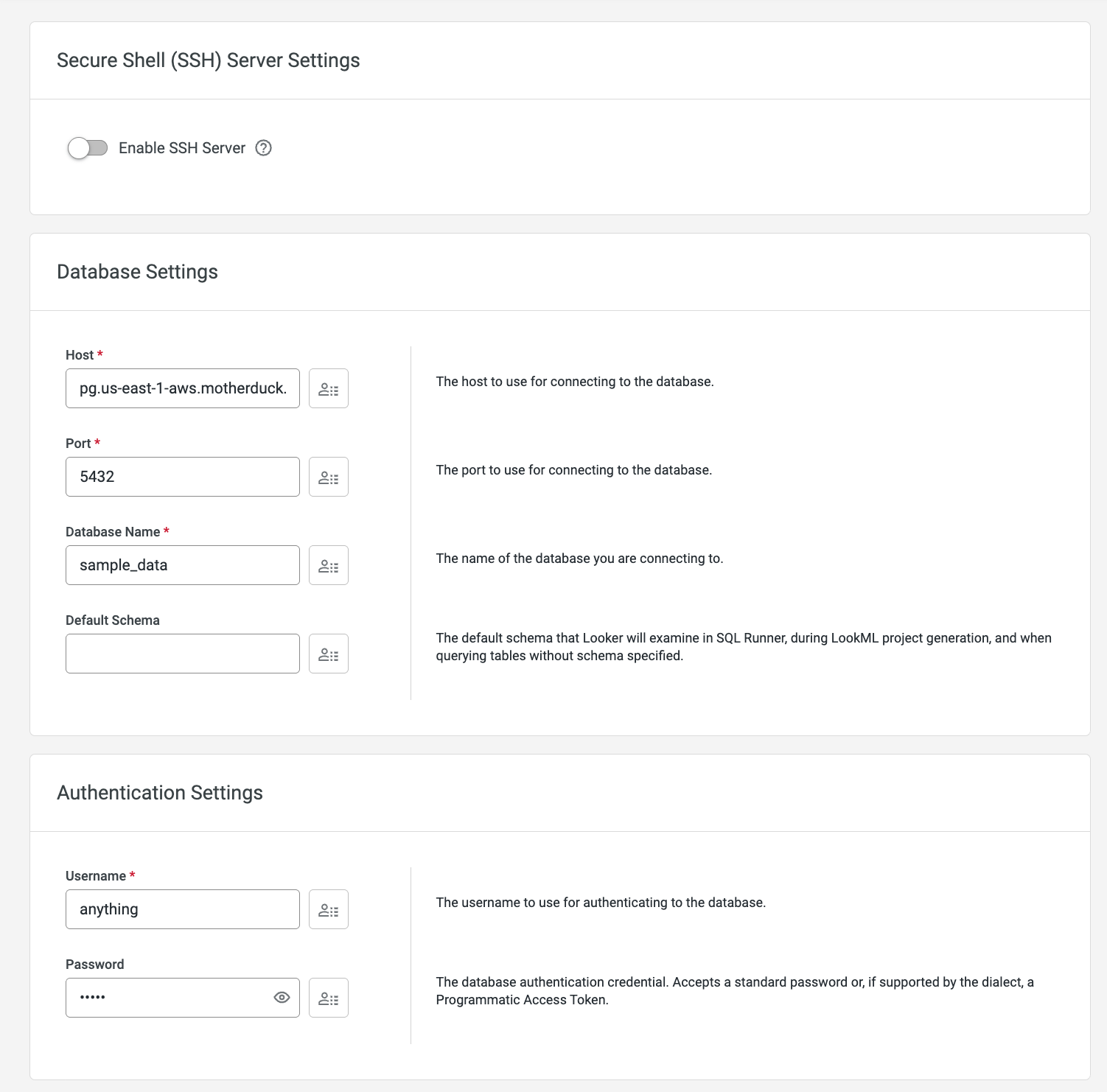
In Looker, go to Admin → Connections → Add Connection and configure:
| Parameter | Value |
|---|---|
| Dialect | PostgreSQL 9.5+ |
| Host | Your MotherDuck Postgres host (for example, pg.us-east-1-aws.motherduck.com) |
| Port | 5432 |
| Database | Your MotherDuck database name |
| Username | postgres |
| Password | Your MotherDuck access token (see Choose the right token) |
| SSL | Enabled |
| Verify SSL | Disabled, unless your Looker instance is configured for certificate verification |
| Additional JDBC Parameters | options=--compatibility-mode=looker (see Maintain user-duckling affinity to also pin users to read scaling ducklings) |
In Optional Settings, enable SSL and Database Connection Pooling. Leave Verify SSL disabled unless your Looker instance is configured to verify the server certificate.

After configuring the connection, click Test these settings. The test runs against MotherDuck and produces a known cancellation warning that is safe to ignore (see Connection test behavior). Click Add Connection to save.
Required: compatibility mode parameter
You must set the following in the Additional JDBC Parameters field:
options=--compatibility-mode=looker
This parameter does two important things:
- Enables symmetric aggregates
- Enables Persistent Derived Table (PDT) support
Without it, symmetric aggregate queries return incorrect results and PDT builds fail.
Enable connection pooling
Enable database connection pooling in Looker's connection settings. DuckDB is optimized for large analytical queries rather than high volumes of short concurrent connections, so pooling reduces connection overhead and improves overall stability. This is the recommended configuration for MotherDuck.
Maintain user-duckling affinity with session_name
When you connect Looker with a read scaling token, each new connection is assigned to one of the read scaling replicas ("ducklings") in your pool. By default Looker does not identify individual end users to MotherDuck, so a given user's queries can land on different ducklings and miss the warm cache.
You can pin each Looker user to a consistent read scaling duckling by passing the session_name parameter. MotherDuck routes all connections that share the same session_name value to the same replica, which improves cache reuse and gives that user a more consistent view of the data — while still letting the read scaling fleet scale out across many users.
Looker can substitute a user attribute into the connection's Additional JDBC Parameters at connect time. Pass the user attribute as session_name under options=, alongside the required compatibility-mode flag:
options=--session_name={{ _user_attributes['email'] }} --compatibility-mode=looker
In this example, email is the user attribute used as the passthrough identifier, so each Looker user's queries are routed to a single read scaling duckling. Any configured Looker user attribute can be used instead of email — pick a value that is stable and unique per user (for example, a user ID or a hashed identifier for privacy).
Set up the passthrough user attribute in Admin → Users → User Attributes in Looker before referencing it in the connection. See the Looker user attributes documentation for details. This is most useful for customer-facing / embedded analytics, where each end user should reuse their own duckling's warm cache.
Choose the right token
MotherDuck supports two token types. Choose based on how your Looker deployment will use the connection:
| Token type | Use when | Notes |
|---|---|---|
| Read scaling token | Reporting / BI usage with many concurrent users (reads only) | Recommended for the main Looker connection when PDT writes are not needed on this connection. |
| Read/write token | PDT builds, or any connection that needs to write tables | Looker supports configuring a separate PDT connection — you can use a read/write token there while keeping a read scaling token on the main connection. |
Connection test behavior
When you run Looker's built-in connection test, you may see a warning that query cancellation does not work. This is expected and can be safely ignored. The warning is produced because the test cancellation query itself fails due to memory consumption — not because the cancellation mechanism is broken. Production query cancellation is unaffected.
Troubleshooting
| Symptom | Resolution |
|---|---|
| Symmetric aggregate queries fail or return incorrect results | Ensure options=--compatibility-mode=looker is set in Additional JDBC Parameters. |
| PDT build fails or Explore intermittently errors | Check Admin → PDT → PDT Details for build status and last SQL. Confirm the table exists in your MotherDuck scratch schema. |
| Connection test shows cancellation warning | Expected behavior. The warning appears only during the test query and does not affect production query cancellation. |
| Read scaling users aren't reusing a warm cache / land on different ducklings | Add --session_name={{ _user_attributes['<attribute>'] }} under options= in Additional JDBC Parameters so each user is pinned to one duckling (see Maintain user-duckling affinity). |
Additional information
- Postgres endpoint reference for connection parameters, SSL options, and limitations
- Connect through the Postgres endpoint for a general how-to guide
- Read scaling and session_name
- Looker documentation: Connecting Looker to your database
- Looker documentation: User attributes