
Shopify
Shopify is a commerce platform for online stores. Load Shopify orders, customers, and products into MotherDuck on a schedule with a Flight that runs dlt's Shopify source.
The Shopify Admin API holds the orders, customers, and product records behind sales reporting. To analyze that data in MotherDuck, run dlt's Shopify source and load it into a MotherDuck database.
How it works with MotherDuck
Dlt ships a Shopify verified source that reads the Admin API with cursor pagination and incremental date filtering that you can run in a Flight, so MotherDuck runs the pipeline on a schedule with no infrastructure of your own.
shopify_source() provides three resources, all loaded incrementally on updated_at:
| Resource | Contents |
|---|---|
orders | Transactions placed in the store, with nested line items and addresses. |
customers | Accounts created in the store. |
products | Items available for sale, with nested variants. |
A separate shopify_partner_query() resource runs arbitrary GraphQL against the Shopify Partner API. That's a different credential and audience, so treat it as a separate pipeline.
Prerequisites
-
A MotherDuck account on a plan that includes Flights.
-
A Shopify app created in the Dev Dashboard, installed on your store.
-
The app's Client ID and Client secret from the Dev Dashboard. The secret starts with
shpss_. There is no permanent Admin API token to copy: you exchange these two values for a short-lived token, as shown below. -
The app and the store must belong to the same Shopify organization. This is what the client credentials grant requires, and a mismatch fails with
shop_not_permitted. -
Your store URL, in the form
https://<store>.myshopify.com. -
A target database in MotherDuck. The examples use
shopify. -
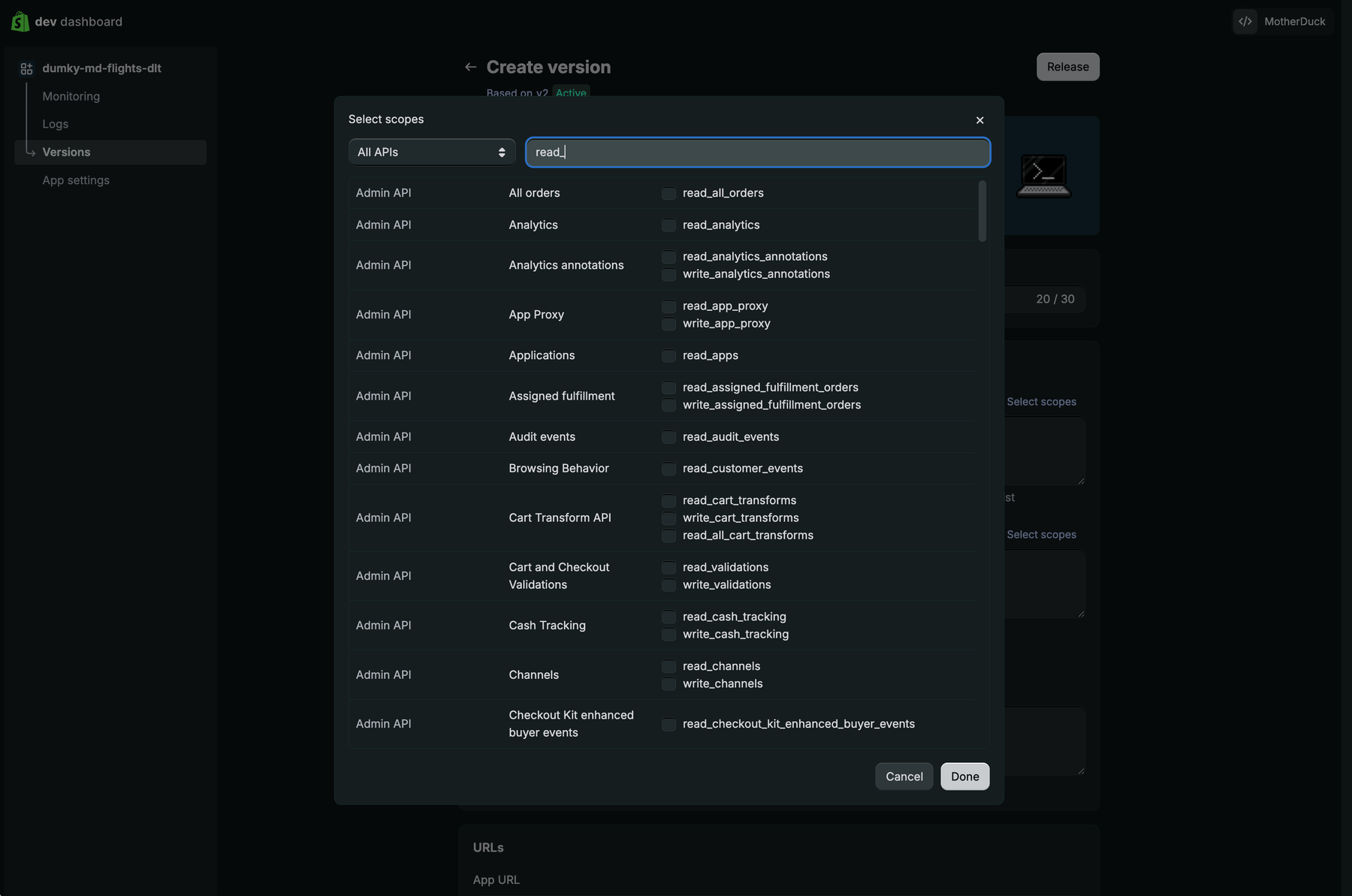
Read scopes for the resources you load, set on an app version in the Dev Dashboard. The example below reads three Admin API endpoints with three scopes:
Resource Scope productsread_productsordersread_orderscustomersread_customersGrant only the ones matching the resources you pass to
with_resources(). If you manage the app with the Shopify CLI, these go in theaccess_scopesblock ofshopify.app.toml.
orders and customers are protected customer data. Public apps need Shopify's review to read them; custom apps have both access levels available without review.
Shopify's Admin API returns only the last 60 days of orders. To load history beyond that, select read_all_orders in addition to read_orders. Without it, a backfill succeeds and silently returns short.
Create the Shopify app
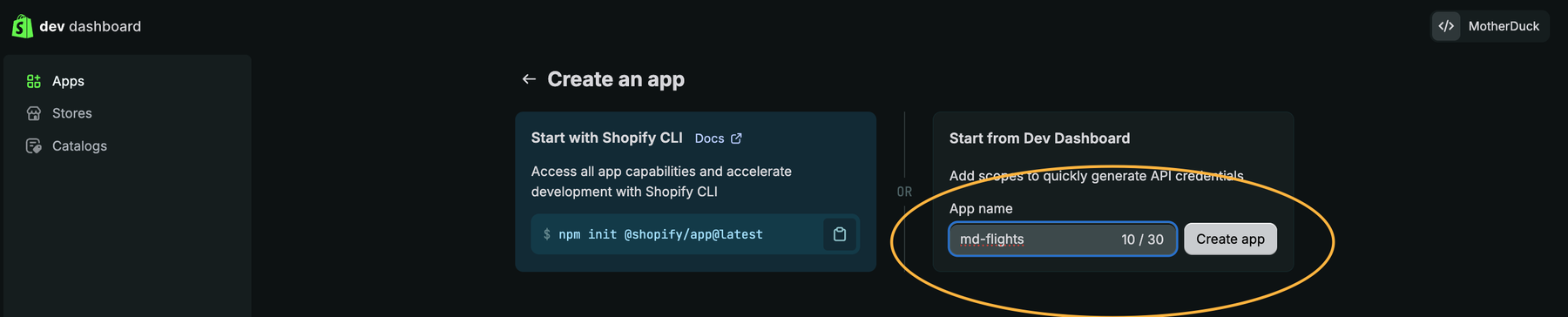
In the Dev Dashboard, open Apps and choose Create an app. Name it, then use Start from Dev Dashboard rather than the CLI: it generates API credentials without scaffolding a local app project, which is all an ingestion pipeline needs.
Go to Versions, create a version, and pick the read scopes for the resources you load. Typing read_ filters the list. read_all_orders appears here too, as All orders.
Release the version, then install the app on your store with Install app on the app's Overview page.

Open App settings to copy the Client ID and reveal the Secret. Shopify masks the secret behind an eye toggle, and Rotate replaces it if it ever leaks.

Store the credentials
Put the client ID and secret in a Flight secret. The Flight exchanges them for an access token at the start of each run, so no token is stored anywhere.
The secret has to exist before you create the Flight, otherwise MD_CREATE_FLIGHT rejects the reference with user_secret not found.
The quickest way is a pre-filled dialog. This link opens Add secret with the type, name, and both parameter rows already set, so you only paste the two values:
Create the shopify Flight secret in your own MotherDuck account.
You can also open Settings > Secrets and add it by hand with type Flights, or use SQL from a write-enabled connection:
CREATE SECRET shopify IN motherduck (
    TYPE flights,
    PARAMS MAP {
        'CLIENT_ID': '<your_client_id>',
        'CLIENT_SECRET': '<your_client_secret>'
    }
);
The store URL isn't sensitive, so pass it in the Flight's config argument:
config := MAP {
    'SHOP_URL': 'https://<store>.myshopify.com'
}
Mint an access token in the Flight
The client credentials grant trades the client ID and secret for an Admin API token, with no redirect and no merchant prompt:
def get_access_token(shop_url, client_id, client_secret):
    response = httpx.post(
        f"{shop_url}/admin/oauth/access_token",
        data={
            "grant_type": "client_credentials",
            "client_id": client_id,
            "client_secret": client_secret,
        },
        timeout=30,
    )
    response.raise_for_status()
    return response.json()["access_token"]
The token lasts 24 hours (expires_in is 86399). That's a poor fit for a long-lived config value but a good fit for a Flight: each run mints its own token, and a run finishes well inside the window.
dlt's argument for this value is private_app_password, legacy naming from Shopify's retired private apps. Pass the token you just minted, not the shpss_ client secret.
If you already have a static token
An admin-created custom app from before 2026 still works, and its shpat_ Admin API token doesn't expire. In that case skip the exchange, drop httpx, and hand dlt the token directly through a secret param named SOURCES__SHOPIFY_DLT__PRIVATE_APP_PASSWORD, which dlt resolves.
Create the Flight
The Shopify source isn't a single file, so install it as a dependency instead of pasting it into source_code. See Use a dlt verified source for how this works and what to watch for.
Beyond dlt, the Flight needs an HTTP client for the token exchange:
duckdb==1.5.5
dlt[motherduck]==1.30.0
httpx==0.28.1
dlt-verified-sources @ https://github.com/dlt-hub/verified-sources/archive/3957506893a7da821dbcc6acd51c7ca4475d1f53.tar.gz
That commit is a known-good pin. Check the commit history for a newer one, and keep a SHA rather than master.tar.gz: a Flight reinstalls its dependencies on every run, so an unpinned URL can change the connector between two runs of a Flight you haven't touched.
Set api_version explicitly. The source's default trails Shopify's supported window, and Shopify removes versions about a year after release. MOTHERDUCK_TOKEN is injected for you, so dlt's MotherDuck destination picks up the credential without configuration.
import os

import dlt
import duckdb
import httpx
from dlt.common.configuration.container import Container
from dlt.extract.incremental.context import TimeIntervalContext

from sources.shopify_dlt import shopify_source

DB = "shopify"


def get_access_token(shop_url, client_id, client_secret):
    response = httpx.post(
        f"{shop_url}/admin/oauth/access_token",
        data={
            "grant_type": "client_credentials",
            "client_id": client_id,
            "client_secret": client_secret,
        },
        timeout=30,
    )
    response.raise_for_status()
    return response.json()["access_token"]


def main():
    os.environ.setdefault("HOME", "/tmp")
    os.environ["DESTINATION__MOTHERDUCK__CREDENTIALS__DATABASE"] = DB

    # dlt attaches the database but never creates it, so make sure it exists.
    duckdb.connect("md:").execute(f'CREATE DATABASE IF NOT EXISTS "{DB}"')

    # Every shopify_dlt resource sets allow_external_schedulers=True, which makes
    # dlt require an Airflow-style interval. Turn that off for all of them at
    # once and leave dlt's own incremental state in charge.
    Container()[TimeIntervalContext] = TimeIntervalContext(
        allow_external_schedulers=False
    )

    shop_url = os.environ["SHOP_URL"].rstrip("/")
    access_token = get_access_token(
        shop_url,
        os.environ["shopify_CLIENT_ID"],
        os.environ["shopify_CLIENT_SECRET"],
    )

    pipeline = dlt.pipeline(
        pipeline_name="shopify",
        destination="motherduck",
        dataset_name="shopify_raw",
    )

    source = shopify_source(
        private_app_password=access_token,
        shop_url=shop_url,
        start_date="2024-01-01",
        api_version="<supported_api_version>",
    ).with_resources("orders", "customers", "products")

    print(pipeline.run(source, loader_file_format="parquet"))


if __name__ == "__main__":
    main()
Create the Flight with MD_CREATE_FLIGHT, passing that Python as source_code, the pinned dependencies as requirements_txt, flight_secret_names := ['shopify'] so the client ID and secret reach the run, and the config map with the store URL. Leave schedule_cron off until a manual MD_RUN_FLIGHT succeeds, then add a schedule with MD_UPDATE_FLIGHT.
Query the result
dlt creates one table per resource in the shopify_raw schema, plus child tables for nested arrays. Order line items land in orders__line_items:
SELECT
    items.title,
    sum(items.quantity) AS units,
    sum(items.quantity * items.price::DECIMAL(12, 2)) AS revenue
FROM shopify.shopify_raw.orders AS orders
JOIN shopify.shopify_raw.orders__line_items AS items
    ON items._dlt_parent_id = orders._dlt_id
WHERE orders.created_at >= current_date - INTERVAL 30 DAY
GROUP BY ALL
ORDER BY revenue DESC
LIMIT 20;
Source options
| Argument | Default | Effect |
|---|---|---|
api_version | 2023-10 | Admin API version. Set this explicitly, since the default ages out. |
start_date | 2000-01-01 | Lower bound for the first incremental load. |
end_date | None | Upper bound. Set both to run a bounded backfill. |
created_at_min | 2000-01-01 | Filters on creation date rather than the incremental updated_at cursor. |
items_per_page | 250 | Page size, which is also Shopify's maximum. |
Known limitations
- The source expects an external scheduler. Every resource declares
allow_external_schedulers=True, which tells dlt to take its load window from an orchestrator rather than from its own state. Despite the name, dlt treats it as a requirement: with no Airflow context and noDLT_INTERVAL_START/DLT_INTERVAL_ENDpair, a run fails withExternalSchedulerNotAvailable. TheTimeIntervalContextoverride above switches it off for every resource at once. Setting the two interval variables also clears the error, but then each run loads a fixed window instead of resuming where the last one stopped. - The client credentials grant needs one organization. The app and the store must sit in the same Shopify organization, or the token request fails with
shop_not_permitted. Across organizations, use the authorization code grant to get a long-lived offline token and pass that instead. - Minted tokens expire after 24 hours. Fine for a Flight that mints one per run, but don't cache the token in
configor a secret between runs. - The default
api_versionis stale. The source defaults to2023-10, and Shopify removes API versions roughly a year after release. Pass a supported version and revisit it when you update the pinned commit. - Orders are limited to 60 days without
read_all_orders. This is a Shopify scope restriction, not a dlt one, and it fails quietly by returning fewer rows rather than raising an error. - Incremental loading tracks
updated_at. A record edited in Shopify reappears in the next load, which is what you want, but it means row counts per load don't equal new records. - Money fields arrive as strings. Shopify returns amounts as decimal strings, so cast them in SQL, as in the query above, rather than assuming a numeric type.
- Only three Admin API resources are covered. Inventory, fulfillments, discounts, and payouts aren't included. For those, use dlt's REST API source against the endpoints you need.
- The connector isn't editable when installed as a dependency. To change extraction logic, use
dlt init shopify_dlt motherduckin a local project.
Managed alternatives
If you'd rather not run the pipeline yourself, Fivetran and Airbyte both offer a Shopify source and a MotherDuck destination.